Recent Posts


Welcome To My Blog

Hello Guys,I am Bassel and I welcome you to my blog.

This Group is made for those People who want to learn more about computers

This blog provides you with free Tips and Tricks about Computer and teacher you how you could save yourself from hacking.

Knowledge is For Sharing.

Remember Guys...This Group doesn't encourage you to do hacking.Legally,Hacking is a Crime and a Hacker is a Criminal.Everything I teach You here is for Knowledge Pupose.

Solutions to your Problems

Anyone can ask Me about problems of their Computers and I'll Help you with that.

Follow Me Please!

If You like the Tricks and Posts in this blog you can Follow it too.

Showing posts with label PPoE. Show all posts

Monday, February 27, 2012

What Is PPPoE and bridge mode of ADSL Modem


There are two ways to configure an ADSL modem for broadband connection. One in PPPoE (Point to Point Protocol over Ethernet) and the another is Bridge mode.
PPPoE Mode

In this mode the modem works as router and the PPPoE session terminates on WAN port of router. The PPPoE client is in built in the modem and allocated by BRAS server gets assigned to WAN port of modem. The Internal network has to use the private IP and for Internet access NATing happens in modem. In PPPoE mode the modem is configured in such a way that the user id and password are stored inside the Modem. Internet connection will be established as you switch on the Modem.

PPPoE Mode
Bridge Mode

In this mode the modem works as transparent Ethernet bridge and therefore you need to run the PPPoE client software ( for login authentication) on your PC/server. WIN XP systems have this feature inbuilt but for other operating systems you need to buy it from market. Some freeware like RASPPPoE, Enternet etc. are also available on the Internet.
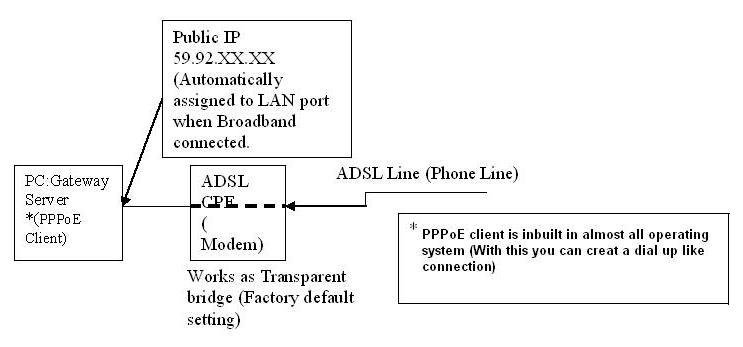
bridge mode

Both the modes can be used as per the requirement and application. Here enumerating the main differences

PPPoE mode

1. User id and password stored inside the Modem.
2. Multiple PCs can be connected. For example most of the basic ADSL Modems having at least one ADSL port and one USB port. In PPPoE mode, can connect one PC to Ethernet port and one PC to USB port which enable simultaneous internet usage in both the PCs.
3. PPPoE mode is more secured.
4. For Torrents download, appropriate ports need to be forwarded.

Bridge Mode

1. In bridge mode user id and password to be entered in the dialer of computer.
2. Only single PC can be connected.
3. For torrents download port forwarding is not required.
4. Less secured because all the ports are open need good firewall to avoid virus infection.

 
Twitter Bird Gadget